

Best Claude Skills to Make Your AI Workflow 10x Smarter
Discover the best Claude Skills and commands for brainstorming, planning, execution, UI design, frontend work, realtime search, data collection and feature development.
Claude becomes much more powerful when you use the right Skills.
If you only use Claude as a normal chatbot, you will often repeat the same setup: explain the context, describe the workflow, define the output format, set quality standards, and revise several times.
But with Claude Skills or well-designed commands, repeatable workflows can become faster, clearer and more consistent.
For example:
- Need to refine an idea? Use a brainstorming skill.
- Need to write a plan? Use a planning skill.
- Need to design UI components? Use a UI/UX skill.
- Need frontend direction? Use a frontend skill.
- Need realtime data? Use a search or crawl workflow.
- Need to build a feature? Use a feature development skill.
According to Anthropic, Skills are folders of instructions, scripts and resources that Claude can dynamically load to improve performance on specialized tasks. In simple terms, instead of teaching Claude your workflow from scratch every time, you can package the workflow into a reusable skill.
Here are some of the most useful Claude Skills worth saving.
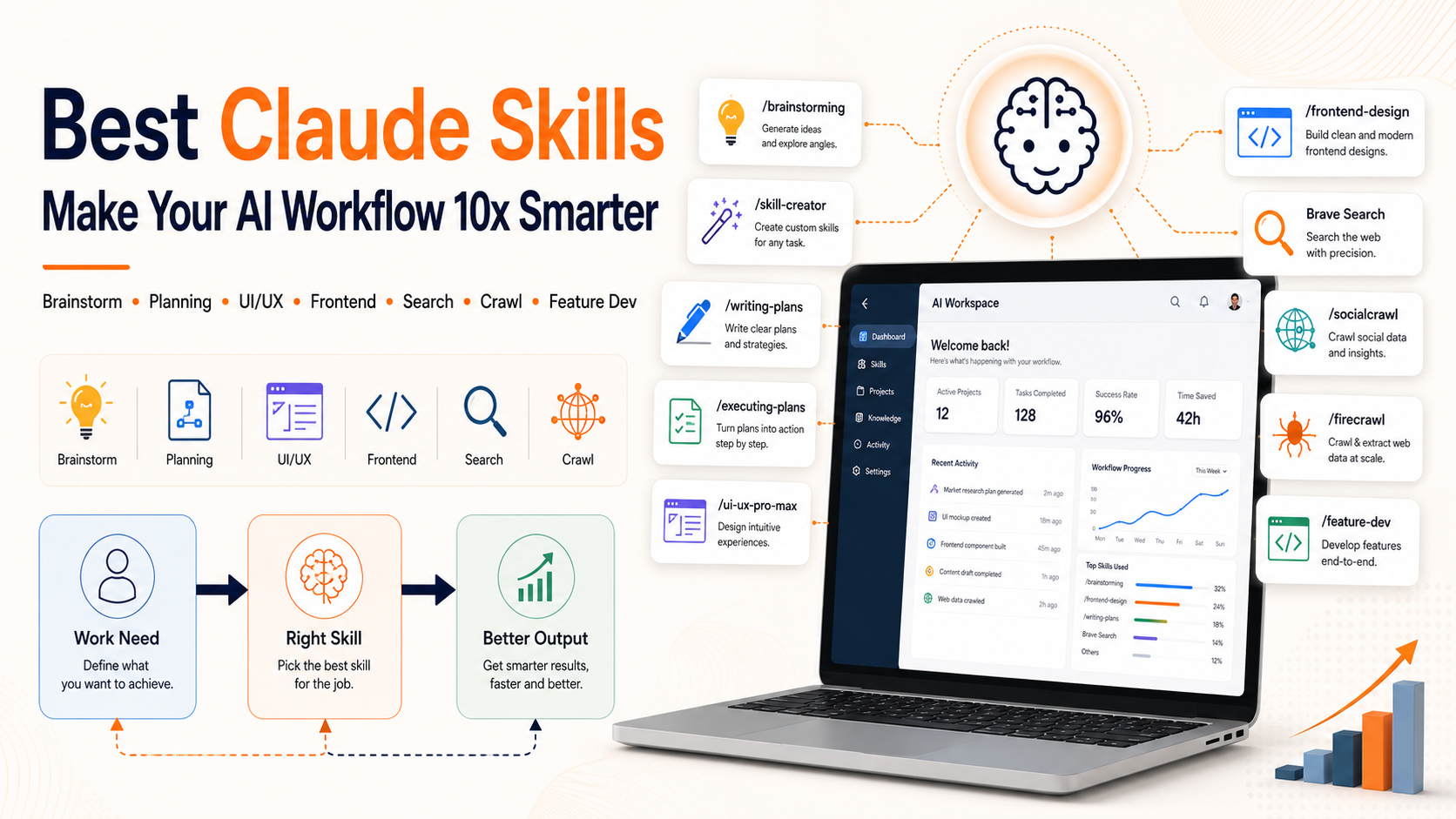
What Are Claude Skills?
Claude Skills help Claude perform specialized tasks better.
A Skill can include:
- Instructions
- Workflows
- Formatting rules
- Examples
- Supporting scripts
- Reference resources
- Output standards
Anthropic explains that custom Skills extend Claude with specialized knowledge and workflows for personal or organizational use. A Skill can be as simple as a few lines of instructions or as complex as a multi-file package with executable code.
The key is that a Skill should not be too generic.
A good Skill solves a specific, repeatable task with clear criteria.
Why Skills Make Claude Feel Smarter
Claude does not literally become a different model when you use Skills. But when Skills are designed well, Claude has better context, better instructions and a clearer workflow.
That makes Claude feel smarter because:
- You repeat less context
- Outputs become more consistent
- Workflows become clearer
- Repetitive tasks move faster
- Claude knows which procedure to use
- Standards, examples and resources can be included
- The workflow fits your personal or team process better
Anthropic recommends starting simple, writing clear descriptions, testing Skills with different prompts and organizing them by purpose instead of building one Skill that tries to do everything.
A Note About the Commands in This Article
Commands such as:
/brainstorming
/skill-creator
/writing-plans
/executing-plans
/ui-ux-pro-max
/frontend-design
/socialcrawl
/firecrawl
/feature-dev
should be understood as examples of commands or custom Skills.
Depending on your setup, they may be:
- Custom Skills you create
- Claude Code commands
- Installed plugins or workflows
- Internal team shortcuts
- Suggested naming conventions for your own Skills
In Claude Code, Anthropic notes that saving a SKILL.md file in .claude/skills/<name>/ can create a /name Skill that a team can reuse.
So do not assume every command is available by default in your Claude account. The important part is understanding the workflow behind each Skill and creating the ones that match your needs.
The Best Claude Skills to Save
1. /brainstorming — When You Need to Refine an Idea
When to use it
Use this when you already have an idea, but it feels rough, generic or unclear.
Useful for:
- Product ideas
- Content ideas
- Campaign ideas
- New features
- Lead magnets
- Article hooks
- Video scripts
- Fresh angles for old topics
Example prompt
Use the brainstorming skill.
Here is my idea:
[PASTE IDEA]
Help me:
- Clarify the core idea
- Find what makes it different
- Analyze it from the user’s perspective
- Suggest 10 possible directions
- Choose the 3 fastest directions to implement
- Recommend the first step
Main value
This Skill does not only give you more ideas. It helps you generate better, clearer and more practical ideas.
2. /skill-creator — When You Need to Create a New Skill
When to use it
Use this when you notice you repeat the same type of work often.
Examples:
- Writing bilingual SEO articles
- Reviewing code
- Creating test cases
- Drafting customer emails
- Creating social posts
- Analyzing data
- Generating image prompts
- Writing product specs
Instead of prompting from scratch every time, you can create a reusable Skill.
Example prompt
Help me create a new Claude Skill for this workflow:
[DESCRIBE WORKFLOW]
The Skill should include:
- Clear purpose
- When to use it
- Required input
- Step-by-step process
- Desired output format
- Quality standards
- Example prompts
- Common mistakes to avoid
Main value
This Skill turns your working process into a reusable system.
If you write, code or operate repetitive workflows, this is one of the first Skills worth creating.
3. /writing-plans — When You Need to Write a Plan
When to use it
Use this when you need to turn a vague goal into a clear plan.
Useful for:
- Marketing plans
- Learning plans
- Product plans
- Content plans
- Feature launch plans
- Workflow improvement plans
- 7-day, 30-day or 90-day plans
Example prompt
Use the writing-plans skill.
My goal is:
[DESCRIBE GOAL]
Create a plan including:
- Main objective
- Desired outcome
- Implementation phases
- Tasks for each phase
- Suggested timeline
- Required resources
- Key risks
- What I should do today
Main value
This Skill helps you move from “idea” to “action plan.”
4. /executing-plans — When You Need to Execute Tasks
When to use it
Many people have plans but fail to execute because the plan is too broad.
This Skill breaks the plan into tasks that can actually be done.
Useful for:
- Work sprints
- Daily checklists
- Project launches
- Content execution
- Website fixes
- SEO improvement
- Campaign execution
- Progress tracking
Example prompt
Use the executing-plans skill.
Here is my current plan:
[PASTE PLAN]
Help me:
- Break the plan into smaller tasks
- Rank tasks by priority
- Identify what to do first
- Estimate time for each task
- Create an execution checklist
- Point out where I may get stuck
- Suggest how to track progress
Main value
This Skill helps you stop overthinking and start executing with clarity.
5. /ui-ux-pro-max — When You Need to Design UI Components
When to use it
Use this when you need to design an interface, component or layout but do not yet have a clear direction.
Useful for:
- Dashboards
- Landing pages
- Card UI
- Pricing sections
- Tool pages
- Blog pages
- Game interfaces
- Admin panels
- Forms
- Onboarding screens
Example prompt
Use the ui-ux-pro-max skill.
I need to design UI for:
[DESCRIBE SCREEN OR COMPONENT]
Suggest:
- UX goal of the screen
- Layout structure
- Required components
- Main user flow
- Empty / loading / error states
- Visual style direction
- Mobile optimization points
- UX mistakes to avoid
Main value
This Skill helps Claude think less like a generic image generator and more like a UX designer.
6. /frontend-design — When You Want to Avoid Boring AI Design
When to use it
A lot of AI-generated interfaces look clean but generic: white cards, soft gradients, predictable icons and no real product character.
The frontend-design Skill helps create more intentional UI.
Useful for:
- Website tools
- Blog design
- Game interfaces
- Component libraries
- Landing pages
- Hero sections
- Interactive UI
- Frontend prototypes
Example prompt
Use the frontend-design skill.
I am building an interface for:
[DESCRIBE PRODUCT / PAGE / COMPONENT]
Requirements:
- Avoid generic and boring AI design
- Suggest a more distinctive layout
- Keep it usable and responsive
- Recommend typography, spacing and hierarchy
- Suggest micro-interactions if useful
- Create a frontend-ready version
- Explain why this design is better
Main value
This Skill helps turn outputs from “clean but generic” into something that feels like a real product.
7. Brave Search — When You Need Realtime Internet Access
When to use it
Use realtime search when the answer depends on recent information, such as:
- News
- New tools
- Product information
- Updated documentation
- Pricing
- Market trends
- New references
- Competitor information
Example prompt
Use realtime search to check the latest information about:
[TOPIC]
Requirements:
- Prioritize official or reliable sources
- Summarize the key points
- Identify what is newly updated
- Cite sources so I can verify them
- Do not guess if the source is unclear
Main value
Realtime search helps Claude go beyond static knowledge and verify newer information when needed.
8. /socialcrawl — When You Need Realtime Social Data
When to use it
Use this when you want to analyze social signals.
Useful for:
- Tracking trends
- Understanding audience reactions
- Finding viral hooks
- Researching comments
- Analyzing competitor posts
- Finding user pain points
- Creating new content angles
Example prompt
Use the socialcrawl skill to analyze social media data about:
[TOPIC]
Find:
- Frequently mentioned topics
- Common user questions
- Repeated pain points
- Hooks or formats with strong engagement
- Insights for content creation
- 10 post ideas based on the collected data
Main value
This Skill helps you create content based on real audience signals instead of guesswork.
When collecting social data, respect privacy, platform terms and avoid using sensitive personal information without proper permission.
9. /firecrawl — When You Need Realtime Web Data
When to use it
Use this when you need to extract, analyze or summarize data from websites.
Useful for:
- Crawling web documentation
- Analyzing landing pages
- Competitor research
- Summarizing blogs
- Extracting product information
- Creating comparison tables
- Auditing website content
- SEO research
Example prompt
Use the firecrawl skill to collect and analyze data from these websites:
[PASTE URLS OR WEBSITE LIST]
Requirements:
- Extract the main content
- Summarize page structure
- Identify the core message
- Analyze strengths and weaknesses
- Find SEO or UX improvement opportunities
- Create a comparison table if there are multiple sites
Main value
This Skill is especially helpful for SEO, product research, content research and competitor analysis.
10. /feature-dev — When You Need to Think Like a Developer
When to use it
Use this when you need to move a feature from idea to implementation.
Useful for:
- Writing feature specs
- Splitting frontend/backend tasks
- Designing databases
- Creating API contracts
- Planning tests
- Reviewing edge cases
- Writing implementation plans
- Estimating effort
Example prompt
Use the feature-dev skill.
I want to develop this feature:
[DESCRIBE FEATURE]
Help me:
- Clarify the feature goal
- Define the user flow
- Break down requirements
- Suggest data structure if needed
- Suggest APIs or processing logic
- Split frontend and backend tasks
- List edge cases
- Create a test checklist
- Recommend implementation order
Main value
This Skill turns a feature idea into a clearer development plan and reduces the risk of missing requirements or edge cases.
How to Use Claude Skills More Effectively
1. Do Not Create One Skill for Everything
A common mistake is creating one huge Skill like:
/my-ai-assistant
and expecting it to handle everything.
A better approach is to split Skills by purpose:
- /seo-blog-writer
- /ux-review
- /feature-dev
- /bug-analysis
- /email-polisher
- /social-post
- /data-cleaning
Anthropic also recommends organizing Skills by purpose instead of creating one overly broad Skill that tries to do everything.
2. Every Skill Should Have Output Standards
For example, a planning Skill should always include:
- Goal
- Timeline
- Tasks
- Priorities
- Risks
- Next action
A UI review Skill should always include:
- UX issue
- Severity
- Suggested fix
- Better layout example
- Mobile checklist
Clear output formats make Claude’s responses more consistent.
3. Skills Should Include Examples
Examples help Claude understand what good output looks like.
You can include:
Example input:
...
Good example output:
...
Anthropic’s guidance says good Skills should have clear instructions and examples when helpful.
4. Test Skills with Different Scenarios
Do not create a Skill and immediately use it for important work.
Test it with:
- Simple cases
- Missing-data cases
- Complex cases
- Table-format cases
- Cases where Claude should ask clarifying questions
If the response is weak, improve the Skill description and output standards.
Suggested Workflows
Content Workflow
- /brainstorming to find ideas
- /writing-plans to create an outline
- /socialcrawl to find audience insight
- /writing-plans to turn the outline into a content plan
- /executing-plans to split publishing tasks
- /frontend-design if you need visuals or landing pages
Product Development Workflow
- /brainstorming to refine the idea
- /feature-dev to write requirements
- /ui-ux-pro-max to design screens
- /frontend-design to create a prototype
- /executing-plans to split implementation tasks
- /firecrawl or realtime search for competitor research
Learning Workflow
- /skill-creator to create a learning Skill
- /writing-plans to build a learning roadmap
- /executing-plans to assign daily tasks
- Realtime search to check updated resources
- /brainstorming to create practical exercises
Common Mistakes When Using Claude Skills
Avoid these mistakes:
- Creating Skills that are too generic
- Not defining when the Skill should be used
- Not specifying the output format
- Not including input/output examples
- Combining unrelated workflows into one Skill
- Not testing Skills before serious use
- Using realtime search/crawl without checking sources
- Expecting Skills to know personal context without providing it
Skills do not replace your thinking.
They package your thinking and workflow more effectively.
Conclusion: Claude Gets Stronger When You Package Workflows into Skills
Claude is not just a chatbot.
Used well, Skills can turn Claude into a personal work system: brainstorming ideas, writing plans, executing tasks, designing UI, building frontend direction, searching realtime information, collecting web data and supporting feature development.
The point is not to have as many commands as possible.
The point is to create the right Skill for the right workflow.
When you package repeatable work into clear Skills, Claude does not just respond faster. It becomes more consistent, more relevant and more useful in your daily work.
CTA
Choose one workflow you repeat every week: writing content, planning, reviewing UI, analyzing competitors or developing features. Then turn that workflow into a Claude Skill with a clear goal, input requirements, step-by-step process, output format and examples. One good Skill can save you a lot of time every time you use it.
FAQ 1: What are Claude Skills?
Claude Skills are reusable folders of instructions, scripts and resources that Claude can load dynamically to perform specialized tasks better. They help Claude follow specific workflows for repeatable work.
FAQ 2: Are Claude Skills built into every Claude account?
Some Skills may be pre-built or available depending on your Claude plan, product surface or organization setup. Other Skills may need to be created manually as custom Skills or installed as part of a workflow.
FAQ 3: What makes a good Claude Skill?
A good Claude Skill solves a specific repeatable task, includes clear instructions, defines when it should be used, provides output standards and includes examples when helpful.
FAQ 4: Can Claude Skills help with coding?
Yes. Claude Skills can support coding workflows such as feature planning, frontend design, code review, bug analysis, API planning and test checklist creation.
FAQ 5: Can I create my own Claude Skills?
Yes. Claude supports custom Skills. They can be simple instruction files or more complex multi-file packages with scripts and resources, depending on your setup.
FAQ 6: Should I create one large Skill for everything?
No. It is usually better to create separate Skills for separate purposes, such as content writing, UI review, feature development, email polishing or data analysis.