
PHP2Shell: patch PHP now for two critical RCE flaws
PHP2Shell, two critical PHP flaws patched on Oct 21, 2026, allow unauthenticated RCE on any PHP server. How to check, update and mitigate until you can patch.
On October 21, 2026, the PHP project shipped emergency fixes for two critical flaws in the PHP core, CVE-2026-109618 and CVE-2026-109619, known together as PHP2Shell. Both allow unauthenticated remote code execution, both are rated CVSS v4.0 9.2, and they affect every PHP installation that serves web requests: PHP-FPM, Apache mod_php, php-cgi, FrankenPHP and LiteSpeed.
What you need to do fits in one line: move to PHP 8.5.12, 8.4.27, 8.3.36 or 8.2.35 (or your distribution's patched package), then restart every PHP worker.
This guide covers a five-minute check of your servers, how to update in each common setup, stopgaps if you can't patch right away, and the signs that a server has already been hit.
What PHP2Shell is: two flaws in the PHP core
The bugs live in PHP itself, not in your application or framework. Running composer update won't help; the thing to update is the PHP running on your server.
| CVE-2026-109618 | CVE-2026-109619 | |
|---|---|---|
| Advisory title | RCE via OOM corruption | RCE via stale global state |
| Weakness | When memory runs out, PHP bails out while request data is only partly initialized, and request cleanup then treats that half-built data as valid | State owned by one request survives after its memory has been freed, and a later request on the same worker reuses it |
| Trigger | A crafted multipart request that exhausts memory_limit while staying under post_max_size |
One request causes a fatal error; another request on the same worker touches the stale state before PHP reinitializes it |
| Confirmed | Unauthenticated RCE against mod_php with default settings | Use-after-free, memory disclosure, RCE |
| CVSS v4.0 | 9.2 | 9.2 |
Attacker code runs as the web worker's user (often www-data). That's usually enough to read your application's .env file, with the database password and API keys inside it.
PHP gave a day's notice on October 20, 2026, then released the fixes at 14:00 UTC on October 21, 2026.
Is it being exploited?
Sources differ depending on when they were written:
- CISA, in its alert of October 21, 2026: no exploitation observed at the time of publication, but patch immediately, starting with internet-facing systems.
- watchTowr, updated October 22, 2026: exploitation observed in the wild through its honeypot network since October 21, 2026.
- Sansec, updated October 22, 2026: the public exploits don't work against a default PHP installation, and mass exploitation looks less likely than they expected on release day.
The practical takeaway: assume your servers are being scanned, and patch today.
Are your servers affected?
By how PHP runs
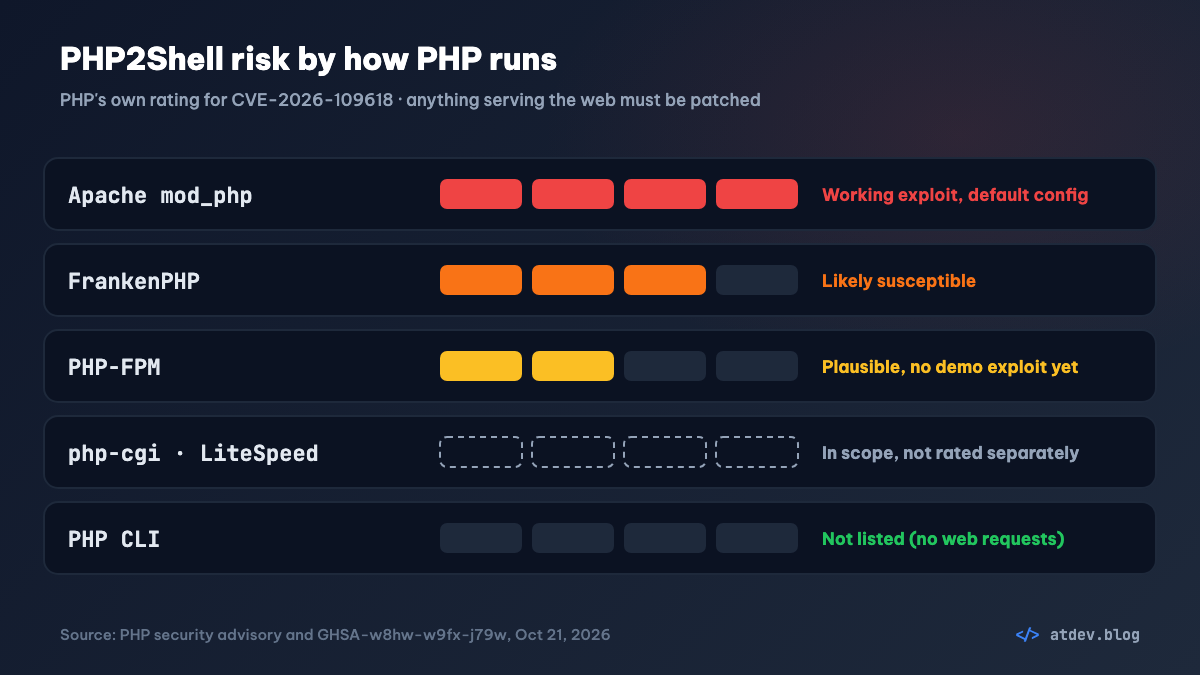
- Apache mod_php: highest risk. PHP says a working exploit triggers from a single unauthenticated request, before any application code runs.
- FrankenPHP: rated "likely susceptible" in the advisory.
- PHP-FPM (Nginx + FPM, the most common setup): "plausibly susceptible", with no demonstrated exploit yet. Patch it anyway.
- php-cgi, LiteSpeed: listed as affected.
- PHP CLI (cron, queue workers,
artisan): not on the list, since it doesn't serve web requests. It usually gets updated along with the rest of your PHP packages anyway.
Remember that PHP hides inside a lot of other software: WordPress, phpMyAdmin, old internal tools, hosting control panels. CISA recommends inventorying every system that runs PHP, even as a component.
By version
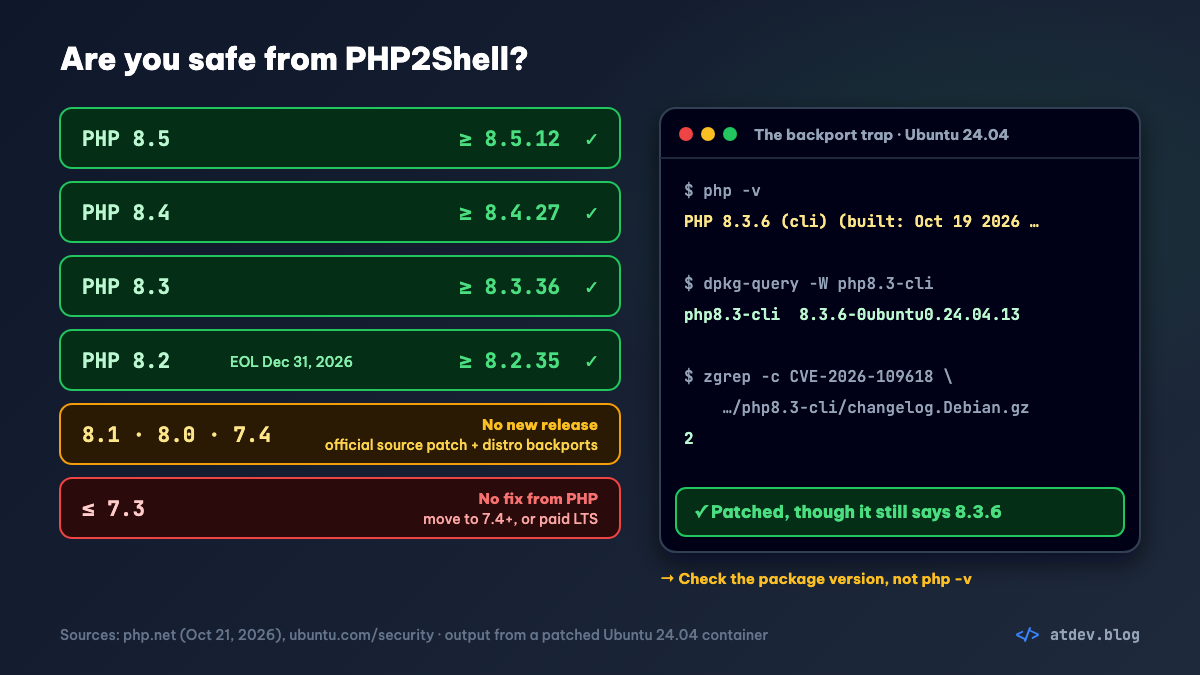
| PHP branch | Safe from | Notes |
|---|---|---|
| 8.5 | 8.5.12 | |
| 8.4 | 8.4.27 | |
| 8.3 | 8.3.36 | |
| 8.2 | 8.2.35 | Security support ends December 31, 2026 |
| 8.1, 8.0, 7.4 | No new release | Official source patches from PHP; patched packages from your distribution, the ondrej PPA or an LTS vendor |
| 7.3 and older | No fix from PHP at all | Still affected; only a few distribution or paid routes remain, see the old-PHP section below |
PHP 8.5 has an extra problem. The two settings on the confirmed exploit paths of CVE-2026-109619, session.upload_progress.enabled and fatal_error_backtraces, are both on by default. We checked this on the official php:8.5.12-cli Docker image.
Check your servers in five minutes
The commands below only read, and target Ubuntu/Debian. RHEL, Rocky and Alma equivalents are in the update section.
1. Find the PHP that serves the web, not the one in your terminal
php -v only tells you about the CLI. With several versions installed side by side, FPM can be a different version entirely:
ls /etc/php/
systemctl list-units 'php*-fpm*' --no-legend
php-fpm8.3 -v
The first command lists installed versions, the second shows which FPM services are running, and the third asks FPM 8.3 for its version; swap 8.3 for whatever you found.
Check whether Apache runs mod_php:
apache2ctl -M 2>/dev/null | grep -i php
A line containing php (such as php_module) means mod_php, the highest-risk group.
2. Don't trust the version number alone: the backport trap
Ubuntu and Debian don't move PHP to 8.3.36. They apply the fix to the version they ship and bump the package version. Here's what a patched Ubuntu 24.04 looks like when we tried it:
$ php-fpm8.3 -v
PHP 8.3.6 (fpm-fcgi) (built: Oct 19 2026 15:16:58)
$ dpkg-query -W php8.3-fpm
php8.3-fpm	8.3.6-0ubuntu0.24.04.13
php -v still says 8.3.6, yet the package is patched. So check the package version:
dpkg-query -W -f='${Package} ${Version}\n' 'php8.3*'
Or ask the package changelog whether it mentions the CVE. Any count above 0 means the fix is in:
zgrep -c 'CVE-2026-109618' /usr/share/doc/php8.3-fpm/changelog.Debian.gz
Compare it with this table (taken from the Ubuntu and Debian security trackers on October 23, 2026):
| OS | Package | Patched from |
|---|---|---|
| Ubuntu 26.04 | php8.5 | 8.5.4-0ubuntu1.5 |
| Ubuntu 24.04 | php8.3 | 8.3.6-0ubuntu0.24.04.13 |
| Ubuntu 22.04 | php8.1 | 8.1.2-1ubuntu2.28 |
| Ubuntu 20.04 and older | php7.x | Only through ESM (Ubuntu Pro) |
| Debian 13 (trixie) | php8.4 | 8.4.27-1~deb13u1 |
| Debian 12 (bookworm) | php8.2 | 8.2.35-1~deb12u1 |
| ondrej PPA (Ubuntu 24.04/22.04) | php8.2 → php8.5 | 8.2.35-1, 8.3.36-1, 8.4.27-1, 8.5.12-1 (with a +ubuntu… suffix) |
3. Servers running Docker
docker ps --format '{{.Image}}\t{{.Names}}' | grep -i php
docker exec <container> php -v
The official php images on Docker Hub are built from PHP source, so php -v inside them shows the upstream number: 8.3.36, 8.4.27 and so on. Images built on Ubuntu or Debian packages need the package check from step 2.
Updating, setup by setup
Ubuntu/Debian (distribution packages or the ondrej PPA)
sudo apt update
sudo apt-get install --only-upgrade 'php8.3*'
Swap 8.3 for your version. This only upgrades PHP 8.3 packages you already have and installs nothing new. To update the whole system, use sudo apt upgrade.
RHEL, Rocky, AlmaLinux (Remi repository)
On October 21, 2026, PHP warned that the Remi repository didn't have the fix yet. By October 22, 2026, Remi had published 8.2.35, 8.3.36, 8.4.27 and 8.5.12.
sudo dnf upgrade 'php*'
sudo systemctl restart php-fpm
If you use Remi's Software Collections (php83, for example), upgrade 'php83*' and restart the php83-php-fpm service.
Docker
Rebuild so the new base image gets pulled, then recreate the containers:
docker compose build --pull
docker compose up -d
To be certain, pin the exact version in your Dockerfile rather than just the branch, for example FROM php:8.3.36-fpm.
Shared hosting, cPanel and other control panels
You can't update PHP yourself here. Ask your host whether they've rolled out the fix, and switch your sites to 8.2 or later if they're still on 8.1 or older.
Windows
Download the new builds from the php.net downloads page.
Restart, then check again
Updating packages isn't enough: running workers keep the old code in memory. Restart every service that uses PHP:
sudo systemctl restart php8.3-fpm
sudo systemctl restart apache2
The second line is for Apache with mod_php. Then rerun the checks above. systemctl status php8.3-fpm shows when the service last started, which confirms the workers are running the new build.
Still on old PHP (8.1, 7.4, 7.3…)? Here's the plan
This is the hardest group, and usually the systems nobody wants to touch: a CRM running since 2018, an admin panel written in CodeIgniter, a Laravel 5–8 project that never got upgraded. Three facts first:
- PHP 7.3, 7.2 and 5.6 are affected too. According to Sansec, the bugs are present in every unpatched PHP since 5.4.
- PHP ships no new release for 8.1 and older (no 7.4.34, no installers), but its security team did publish official source patches for 7.4, 8.0 and 8.1. There is no patch for 7.3.
- The official
phpDocker images for old branches aren't rebuilt. On Docker Hub,php:8.1was last updated on December 31, 2025,php:7.4in November 2022 andphp:7.3in March 2022.
The plan has three steps: block today, find a patch this week, then plan the upgrade.
Step 1, today: keep old PHP away from internet traffic
CISA advises taking PHP 8.1-and-older systems offline until they're patched. In practice:
Internal systems (admin panels, ERP, CRM, staff tools): only allow your office or VPN IPs. A request blocked at Nginx never reaches PHP, so the flaw has no way in:
server {
    # ... your existing config ...
    allow 203.0.113.10;   # your office or VPN IP
    deny  all;
}
On Apache, replace Require all granted with Require ip 203.0.113.10 in the site's <Directory> block. Leaving both lines in lets everyone through. If you can't pin an IP, turn on authentication at Nginx (auth_basic); unauthenticated requests are stopped before they reach PHP as well.
Public sites you can't close: apply the settings from the temporary mitigations section below (skip fatal_error_backtraces, which only exists on PHP 8.5), turn on a WAF if you have one, and move straight to step 2.
Step 2, this week: find the patch for your platform
No official release doesn't mean no patch. Distributions and long-term support vendors have backported the fix to many old branches (checked October 23, 2026):
| What you run | Patch | Cost |
|---|---|---|
| Ubuntu 22.04's php8.1 | Yes (8.1.2-1ubuntu2.28), regular updates | Free |
| ondrej PPA (Ubuntu 24.04/22.04) | php7.4, php8.0 and php8.1 rebuilt on October 21, 2026 | Free |
| Ubuntu 20.04 (php7.4), 18.04 (php7.2), 16.04 (php7.0) | Yes, through Ubuntu Pro's ESM | Free for up to 5 machines for personal use; paid for businesses |
| Debian 11 (php7.4), 10 (php7.3), 9 (php7.0) | Yes, through Freexian ELTS (per Sansec) | Paid |
| RHEL 8, 9, 10 | Some updates out, others in progress (bulletin RHSB-2026-013) | Subscription |
| AlmaLinux 8–10 | Every PHP stream AlmaLinux ships (per Sansec) | Free |
| cPanel + CloudLinux | ea-php52 through ea-php85 (per Sansec) | Part of the license |
Official Docker images php:8.1, php:7.4, php:7.3 |
None | |
| Any platform | TuxCare ELS (alt-php 5.2–8.5), ZendPHP LTS (7.2, 7.3, 7.4, 8.1) | Paid; TuxCare starts at $5,000/year for up to 10 licenses |
Once installed, check that the package changelog mentions CVE-2026-109618, as in the check section above. If it doesn't, ask your vendor rather than assuming you're covered.
PHP 7.3 specifically: 7.3 itself has only three patch routes: Debian 10 with Freexian ELTS, cPanel/CloudLinux (ea-php73), or paying for TuxCare or ZendPHP LTS. For most systems, the quickest route is moving to PHP 7.4:
- 7.3 to 7.4 is the smallest possible jump, still on the 7.x line, with far fewer breaking changes than going to 8.x.
- 7.4 has the official PHP patch, and the ondrej PPA rebuilt its php7.4 packages on October 21, 2026.
- Laravel 8 runs on 7.4 (Laravel 8's
composer.jsonrequires"php": "^7.3|^8.0").
The catch: 7.4 is still end-of-life, with only the two PHP2Shell bugs fixed. Treat it as an emergency step, not a destination.
Building PHP yourself (custom Dockerfile, unusual environment) for 7.4, 8.0 or 8.1: take the source from the patch branch on PHP's official repository and build as usual with the ./configure options you already use:
git clone --depth 1 --branch PHP-7.4-CVE-2026-109618-109619 https://github.com/php/php-src.git
The 8.0 and 8.1 branches follow the same naming. On the 7.4 branch, the patch is commit 712e60f from October 18, 2026, by Arnaud Le Blanc, one of the PHP developers credited in the advisory. It fixes only the two PHP2Shell bugs and doesn't revive the branch: any other vulnerability found since end-of-life is still there.
Step 3: plan the upgrade
A patch for old PHP only buys time. Aim for PHP 8.3 or later: 8.3 gets security fixes until December 31, 2027, 8.4 until December 31, 2028, and 8.5 until December 31, 2029. PHP 8.2 ends on December 31, 2026, so treat it as a stepping stone at most.
With Laravel, your framework version decides which PHP you can run:
| Laravel | Supported PHP |
|---|---|
| 6, 7 | 7.2 – 8.0 |
| 8 | 7.3 – 8.1 |
| 9 | 8.0 – 8.2 |
| 10 | 8.1 – 8.3 |
| 11 | 8.2 – 8.4 |
| 12 | 8.2 – 8.5 |
| 13 | 8.3 – 8.5 |
For a Laravel 8 app on PHP 7.3, go in three stages:
- Stop the bleeding: move to PHP 7.4 as in step 2. Laravel 8 runs on it and your code barely changes.
- Cross into 8.x: move to PHP 8.1, which Laravel 8 still supports, using Ubuntu 22.04's backported packages or the ondrej PPA.
- Reach the target: upgrade Laravel to 10 following each version's upgrade guide, then move to PHP 8.3.
Three things help you estimate and de-risk the upgrade:
- See which packages are blocking a newer PHP:
composer why-not php 8.3
- Lint your whole codebase on PHP 8.3 with Docker, without installing anything on the server (adjust the folders to your project):
docker run --rm -v "$PWD":/app -w /app php:8.3-cli sh -c "find app routes config -name '*.php' -exec php -l {} \; 2>&1 | grep -v '^No syntax errors'"
No output means no syntax errors. But php -l only catches syntax: removed functions such as each() or create_function() only fail at runtime, so you still need to test the main flows.
- Run two PHP versions side by side: install
php8.3-fpmnext to the old one, then move sites over one at a time by changing the socket in each site's Nginx config:
fastcgi_pass unix:/run/php/php8.3-fpm.sock;
A project manager's note: what drags an upgrade out is rarely the amount of code; it's missing tests. If an old system has no automated tests, write them for the flows that touch money, orders and login before you switch PHP. That work is also the number to put in your estimate.
Can't patch yet? Temporary mitigations
To be clear: according to PHP, only updating is a complete fix. The settings below block some known attack paths and nothing more. CISA goes further: if you can't update right away, or you're on PHP 8.1 or older, take the system offline until it's patched.
If you have to keep a server up for a few more hours, set these in the FPM pool (on Ubuntu, /etc/php/8.3/fpm/pool.d/www.conf). The php_admin_* form stops applications from overriding them:
php_admin_flag[session.upload_progress.enabled] = off
php_admin_value[memory_limit] = -1
php_admin_value[post_max_size] = 8M
php_admin_value[upload_max_filesize] = 6M
session.upload_progress.enabled = offblocks the confirmed path of CVE-2026-109619. It must be set inphp.ini, the FPM pool or the server config;ini_set()and.user.inidon't work. PHP also suggests keeping it off after patching if you don't use upload progress.memory_limit = -1removes the attacker-controlled out-of-memory failure behind CVE-2026-109618. The trade-off is that a runaway script can eat all the RAM, so put a memory limit at the container or cgroup level. Don't useRLIMIT_ASorRLIMIT_DATA: PHP warns they can trigger this very bug.- A low
post_max_size: 8M if the app doesn't take file uploads, 32M if it does, withupload_max_filesizealways below it. - PHP 8.5: add
php_admin_flag[fatal_error_backtraces] = off.
On mod_php, set the same values in your Apache config, for example php_admin_flag session.upload_progress.enabled off. Restart PHP-FPM or Apache afterwards.
A few layers outside PHP help too:
- Cap request size at Nginx or your reverse proxy, for example
client_max_body_size 8m;. PHP also recommends limiting field count, multipart part count, header count and nesting depth where your proxy supports it. - Turn on a WAF if you have one. CISA considers it partial protection only.
- If performance allows,
pm.max_requests = 1makes each worker handle a single request, so no later request can reuse stale state. It's expensive: every request starts a fresh worker.
Signs a server has been hit
CISA recommends watching for PHP worker processes that launch shells or download tools. Look at the process tree:
ps -eo pid,ppid,user,cmd --forest | grep -A3 -E 'php-fpm: pool|apache2'
sh, bash, curl, wget or nc showing up under php-fpm: pool or apache2 workers is a red flag.
List PHP files in your web root changed since October 21, 2026 (ignoring the ones you just deployed):
sudo find /var/www -name '*.php' -newermt '2026-10-21' -ls
If you suspect a compromise: isolate the server, rotate every password and key in .env (database, mail, APIs), and rebuild from a clean source instead of just deleting the odd files.
Extra steps for Laravel
- Laravel on PHP-FPM or Apache: follow the steps above. Your Laravel version doesn't matter, because the bug is in PHP.
- Laravel Octane with FrankenPHP: FrankenPHP 1.13.2 (October 21, 2026) is built with PHP 8.2.35, 8.3.36, 8.4.27 and 8.5.12. Move your FrankenPHP binary or image to that release or later.
- Queue workers and the scheduler run on the CLI, which isn't in scope. Still, after updating PHP, run
php artisan queue:restartso workers pick up the new build. Supervisor setup for queues is covered in our crontab and Supervisor guide. - Laravel Sail on your laptop: low risk, since it isn't exposed to the internet, but rebuild to stay in sync:
./vendor/bin/sail build --no-cache.
PHP2Shell checklist
- List every server and container that runs PHP, internet-facing ones first.
- Check the PHP version that actually serves the web (FPM or mod_php), not just
php -v. - On Ubuntu/Debian, compare the package version with the table above.
- Update to 8.5.12, 8.4.27, 8.3.36, 8.2.35 or your distribution's patched package.
- Docker: rebuild with
--pulland recreate the containers. - Restart PHP-FPM, Apache and FrankenPHP; for Laravel, also run
queue:restart. - PHP 8.1 and older (7.3 included): block internet access today, find a backported package from the table above, and plan an upgrade to 8.3 or later.
- Can't patch yet: apply the mitigations, but set a same-day deadline to patch.
- Check the process tree and PHP files changed since October 21, 2026.
Sources
Checked October 23, 2026.
- PHP, security advisory of October 21, 2026 and advance notice of October 20, 2026: https://www.php.net/archive/2026.php
- GHSA-w8hw-w9fx-j79w, CVE-2026-109618: https://github.com/php/php-src/security/advisories/GHSA-w8hw-w9fx-j79w
- GHSA-6wmf-4rv5-p3rp, CVE-2026-109619: https://github.com/php/php-src/security/advisories/GHSA-6wmf-4rv5-p3rp
- CISA, Critical Vulnerabilities in PHP Require Immediate Patching: https://www.cisa.gov/news-events/alerts/2026/10/21/critical-vulnerabilities-php-require-immediate-patching
- watchTowr, PHP2Shell FAQ: https://watchtowr.com/intelligence/php-cve-2026-109618-faq/
- Ubuntu CVE-2026-109618: https://ubuntu.com/security/CVE-2026-109618
- Debian security tracker: https://security-tracker.debian.org/tracker/CVE-2026-109618
- Remi, PHP 8.2.35, 8.3.36, 8.4.27 and 8.5.12: https://blog.remirepo.net/
- FrankenPHP releases: https://github.com/php/frankenphp/releases
- Sansec, PHP2Shell (table of patch routes for old PHP): https://sansec.io/research/php2shell
- TuxCare, php2shell patch FAQ: https://tuxcare.com/els-php2shell-patches-faq/
- Red Hat, RHSB-2026-013: https://access.redhat.com/security/vulnerabilities/RHSB-2026-013
- Ubuntu Pro: https://ubuntu.com/pro
- PHP, supported versions: https://www.php.net/supported-versions.php
- Laravel, support policy: https://laravel.com/docs/12.x/releases and https://laravel.com/docs/9.x/releases