
QR Code & Barcode Generator — Customize Colors & Size, Export PNG or SVG
Generate QR codes for URLs, plain text, and WiFi credentials, plus standard barcodes. Customize colors and size, then download PNG or SVG—everything runs entirely in your browser.
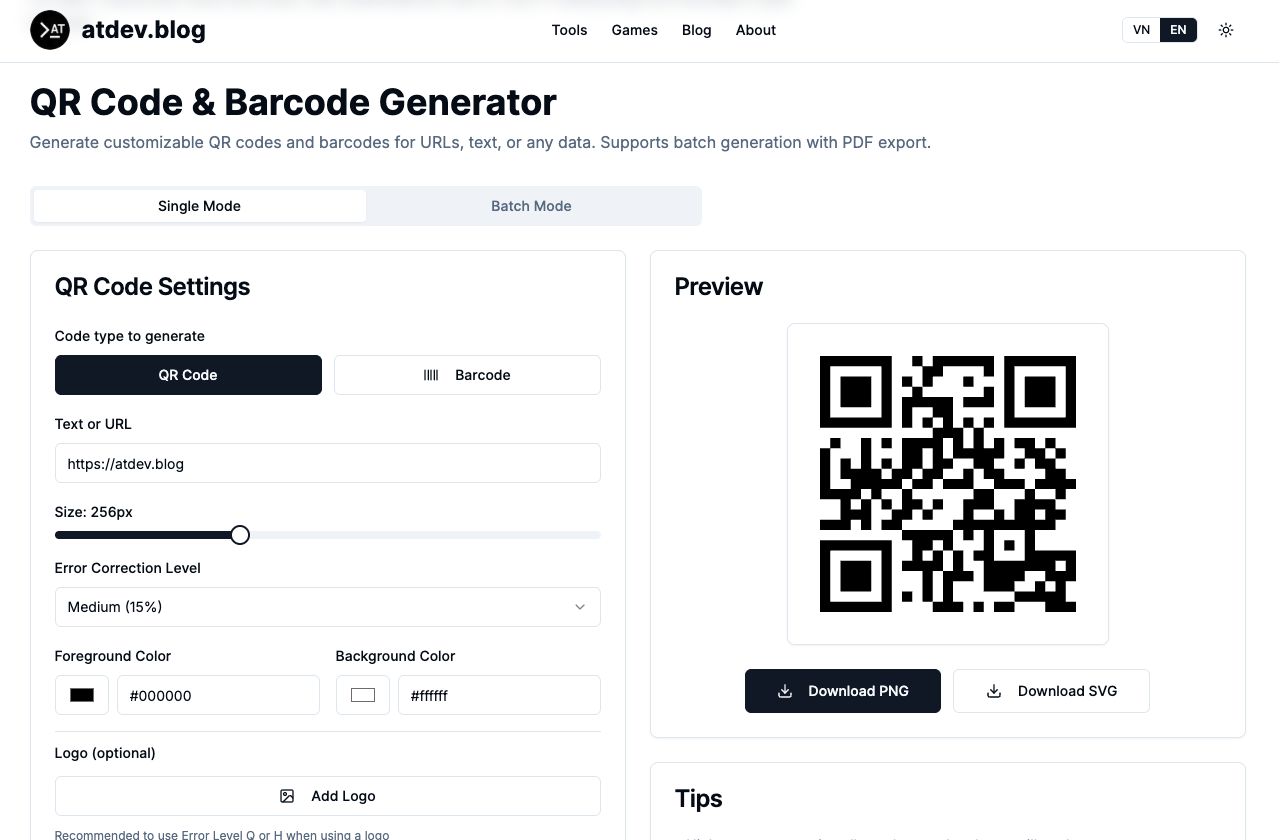
QR codes and barcodes are small, but they’re surprisingly high-leverage: a poster, a product label, a guest WiFi sign, or a campaign landing page can all start with something scannable. What you don’t want is a clunky workflow—installing random apps, waiting on uploads, or guessing whether your export will scan in real lighting. Our approach is simple: generate QR codes for URLs, text, and WiFi credentials, create standard barcodes in common formats, customize colors and size, then download as PNG or SVG—with everything running entirely in your browser.
https://atdev.blog/tools/qr-generator
Why a browser-based generator fits real work
In the wild, teams usually need a mix of:
- URL QR codes for menus, forms, maps, promos, and short links
- Text QR codes for short static payloads (when a URL isn’t the right abstraction)
- WiFi QR codes so guests connect without typing passwords
- Barcodes for retail-style workflows, labeling experiments, packaging mockups, and internal testing
A strong generator isn’t just “an image.” It’s a repeatable way to keep outputs consistent, scannable, and brand-aligned.
QR payloads: what works best in practice
URLs (marketing & operations)
Keep links stable and prefer HTTPS. Very long URLs can create denser QR modules—fine on large prints, risky on tiny stickers.
Plain text
Great for short, static strings. If the content is long, it’s usually better to publish it online and encode a single URL instead.
WiFi credentials
This is one of the most practical everyday wins: fewer typos, fewer support questions, faster onboarding for cafes, offices, rentals, and events. Build it, scan it on a real phone, and adjust if needed
Barcodes: pick a standard that matches scanners and use cases
Barcodes aren’t one-size-fits-all. Depending on your scenario, you may need a common standard format rather than “whatever looks bar-code-y.” Practical tips:
- Small labels need crisp contrast and careful sizing.
- SVG is ideal when you need clean scaling for design systems.
- PNG is ideal for quick placement in decks, docs, and social templates.
If you’re standardizing across a team, document the basics: module/line contrast, quiet zone, and export resolution.
Customize colors and size—without sacrificing scan reliability
Brand-friendly styling is a feature, not a gimmick—if you respect a few guardrails:
- Contrast beats aesthetics when you’re near the minimum print size.
- Busy backgrounds are the #1 reason phones struggle.
- Export format matters: SVG for scalable assets; PNG for fast sharing.
Use our tool to tune colors and dimensions, then download your preferred format
Privacy-first feels better—especially for WiFi and unreleased campaigns
When codes protect access (WiFi) or reflect work-in-progress launches, client-side generation is a sensible default: fewer questions about where your data goes, and a faster loop from idea to asset.
A quick pre-flight before you print or ship
- Test scans on two different phones (iOS + Android).
- Test at a realistic distance—not “perfect lab conditions.”
- Validate on the actual surface (matte paper, glossy label, window decal).
- Keep versioned exports so you can roll back if a campaign changes.
Conclusion
QR and barcodes are physical touchpoints for digital systems. Done right, they’re fast and cheap; done carelessly, they become reprint tickets and “why won’t this scan?” threads. A browser-based generator tightens the loop: create → customize → validate → export.
https://atdev.blog/tools/qr-generator
1) What can I generate with a QR code generator?
You can encode URLs, plain text, and WiFi network details (SSID/password) into QR codes, depending on the tool’s supported modes.
2) What’s the difference between PNG and SVG exports?
PNG is raster-based and great for quick sharing and embedding; SVG is vector-based and scales cleanly for print and design workflows.
3) Will colorful QR codes still scan?
Often yes—if contrast remains strong and the background isn’t visually noisy. Always test on real devices before mass printing.
4) Are WiFi QR codes safe?
They’re convenient, but anyone who can see the QR can potentially connect if they’re in range. Treat them like a visible password: rotate credentials if needed and place signage thoughtfully.
5) What are barcodes used for compared to QR codes?
Barcodes commonly suit retail and linear-scan workflows; QR codes fit smartphone scanning and can hold more flexible payloads like URLs and WiFi setup strings.
6) What does “runs entirely in your browser” mean?
It typically means generation happens locally in your browser session rather than requiring a server upload—still verify the specific tool’s behavior for sensitive data.